
Zombies Aren't Real Wiki › Mods
Zombies Aren't Real mods and mutators
Zombies Aren't Real mods are called mutators, and the ones you switch on apply only to Free Play. Jogamedev's horde-defense strategy game comes with seven, including one that sends the horde in from the map edges and another that gives spent battle abilities a fresh charge.
How to turn on Zombies Aren't Real mods
Open Steam Workshop in the game and choose Manage My Mutators. Use the arrow keys to highlight a row marked Built-in, then press Space to switch it on. Press Esc and start a Free Play run.
For a player-made mod, open the Workshop's Mutators filter and subscribe. Once it downloads, click Mutator Off on the item to turn it on. For player-made cities, see Workshop and custom maps.
You can run several mods together. If two mods change the same setting, the lower mod in the list wins. Select the other mod to see which value took its place. Use Move Up or Move Down to choose which takes priority.
What each built-in mutator changes
| Built-in mod | Free Play rules |
|---|---|
| From the Edges | The horde enters in waves from the map edges. The first wave arrives when you press Ready, and there are no outbreaks inside the map. |
| Inside the Walls | You can place garrisons, snipers, mortars and turrets only in buildings within safe zones. Each stage gives you 10% more money. |
| Landmark City | Each square kilometre can keep up to 4 special buildings, up from 2. You get 35% less money per stage. |
| No Safe Zones | You lose the ability to draw safe zones and gain 25% more skill points per stage. |
| Recharging Arsenal | Placing units in planning costs 40% more. During battle, a used ability regains a charge when its cooldown ends. |
| Swimmer Season | Mosh pits favor swimmers, zombies that can cross water. The mod triples their weight in the pool of possible transformations and gives you 15% more money per stage. |
| Tough Horde | Zombies start with 5 health (normally 1) and can reach 40 (normally 30). Your stage budget rises by 35%. |
Make your own mutator
In the game's Workshop, open Manage My Mutators, choose New Mutator, give the mod a name and click Create. The game switches on your new mod and writes steam_cloud/mods/<name>.ini. That file lists every setting a player-made mod can change, with the current value and the allowed range.
Choose Edit Here to change a value in the game, or Edit File to open the mod in a text editor. For a working example, look at Tough Horde. Under [zombie] it sets hp = 5.0, so zombies start with five health instead of one. To try just that change in your own mod, remove the # in front of the health setting and enter the new value. Leave the other settings commented out.
Save the mod and try it in Free Play. To adjust a mod during a run, press Ctrl+M. If a value has no effect, select your mod in the list. The game explains any ignored setting, including values outside the allowed range. If the game accepts the setting but another mod overrides it, check their order. When the mod plays the way you want, select Publish to share it on the Steam Workshop. Mods can tune existing settings such as health and stage money. Adding a new unit or running custom code falls outside the mutator editor.
Inside the Walls on Boston's first stage
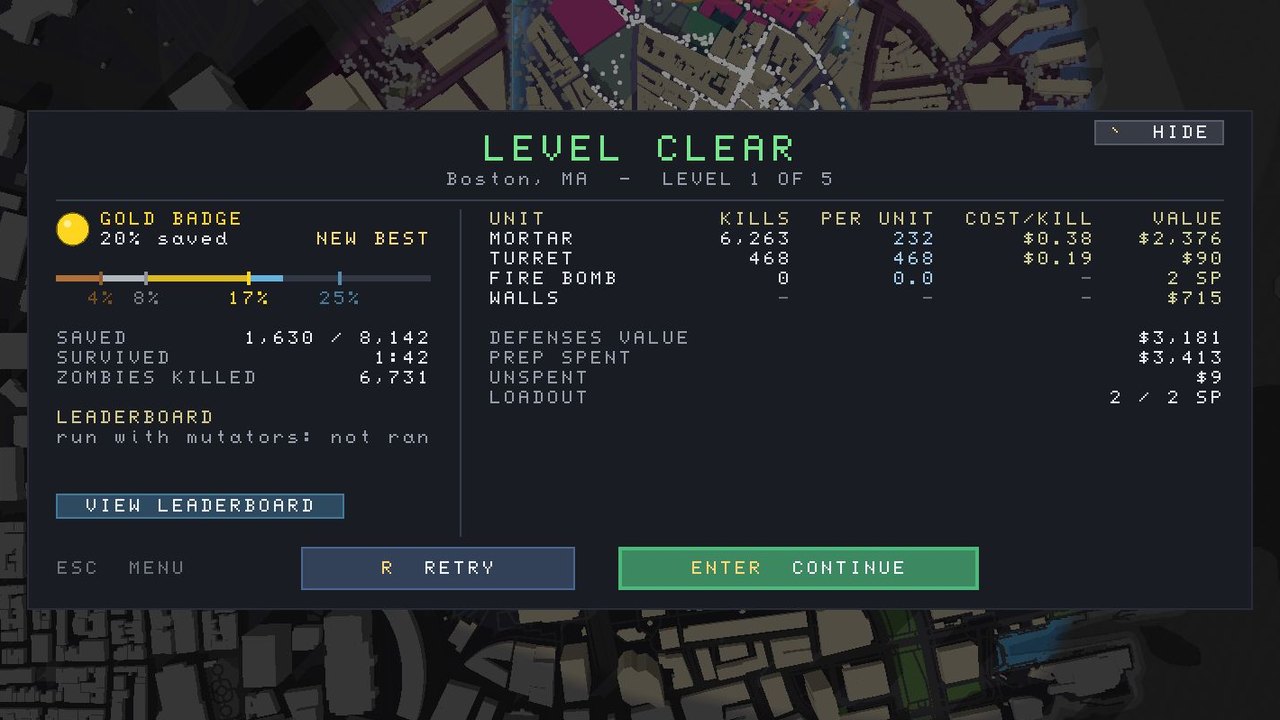
In our Boston 1 run, Inside the Walls raised the opening budget from $3,111 to $3,422. The extra $311 came with a placement rule. With Mortar selected, clicking a building outside a safe zone left both the roof and our balance unchanged. Once we drew a zone around the waterfront blocks, we could put 27 Mortars and a Turret inside it.
The battle HUD showed MUTATED. We saved 1,630 of 8,142 civilians and earned Gold on the modded save. Our Mortars and Turret cleared the last zombie before the Fire Bomb arrived. The results listed zero kills for the bomb and marked the run as unranked.
Where does my Free Play progress go?
Free Play keeps a separate save while mods are active. That save tracks its own badges, unlocks and plans. These runs earn no Steam achievements and submit no leaderboard scores. In our run, Boston showed five empty badge slots when we enabled the mod. After the clear, we switched off all mods with Deactivate All Mutators. The original Boston badges reappeared on the Free Play map list.
Campaigns and the daily challenge use their own rules regardless of your selections. If you played a campaign with mutators before the Free Play restriction, look for it under Free Play on your modded save.
Comments
Site
No comments yet. Ask a question or share what worked in your runs.